For career changers and upskillers

Change careers one week at a time.

Write down the job you want. AI drafts a milestone and a next step for the coming weeks, like a course module or a practice exam. Plan this week's study and practice around it, and use a focus timer to get it done.

Get Leapsteps

Free to start. Pro comes with a 7-day free trial.

How Leapsteps works, in five steps

Most career changes stall long before the job search.

  • The goal is clear. The path isn't.

    Courses, certificates, portfolios, networking. It's hard to know which comes first, so you research instead of starting.

  • Study time is leftover time.

    After work you're tired, and an evening without a plan disappears into tutorials you never finish.

  • Progress is hard to see.

    Months of learning can feel like standing still when there's nothing to show for it yet.

Leapsteps turns the new career into a milestone, a next step and this week's tasks, so each study session builds on the last.

How it works for a career change

These are real screens from the app.

1Set the goal

From "I want to switch careers" to a step you can start.

Write the job you want in your own words. AI drafts options for a milestone months out and a next step for the coming weeks. Pick one, change it or write your own.

  • Steer the ideas with an area of focus, like "exam prep" or "finding clients"
  • Choose a time frame that fits your plan
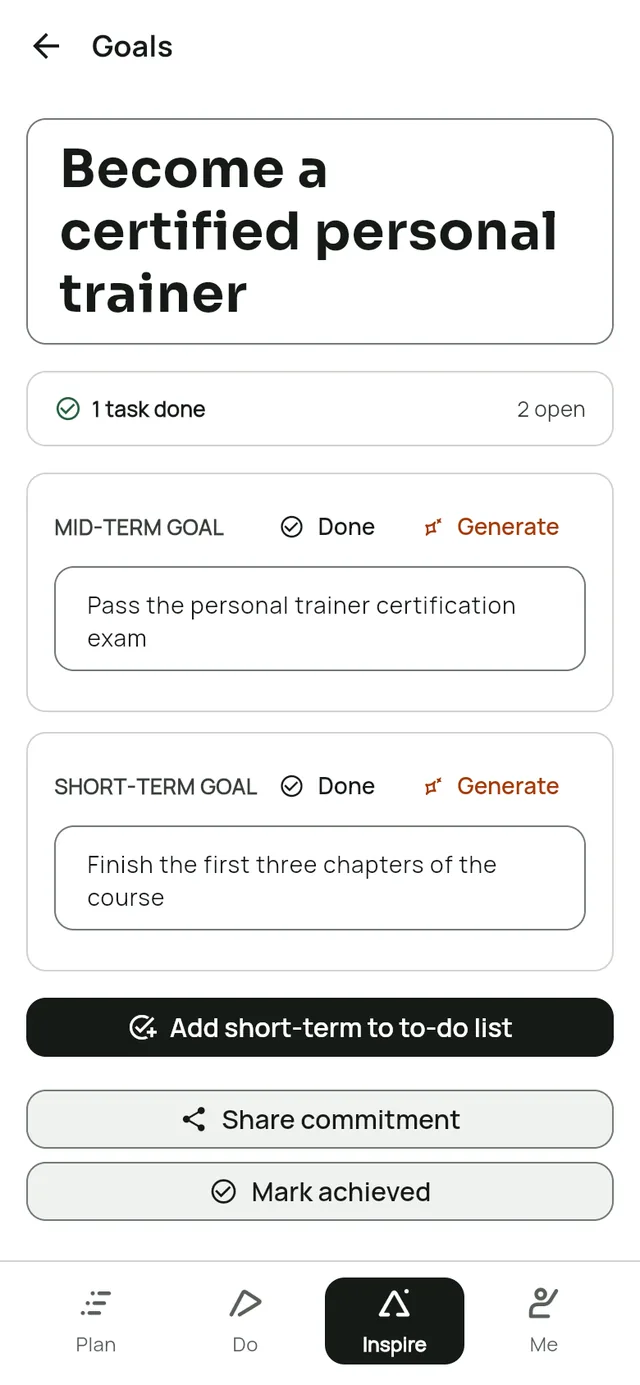
The goal screen in Leapsteps. Long-term goal: Become a certified personal trainer. Mid-term goal: Pass the personal trainer certification exam. Short-term goal: Finish the first three chapters of the course.

2Plan the week

See how each study session moves the goal.

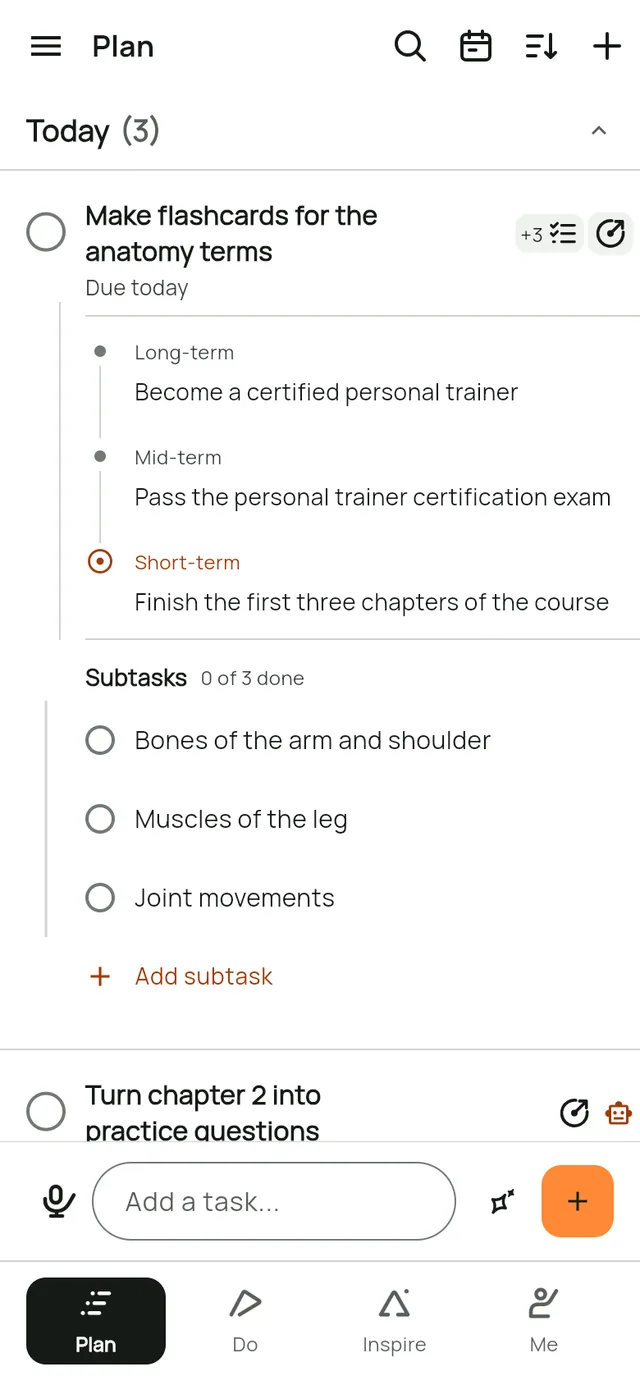
Tap the goal icon on a task to see the career goal it serves, down to this week's step. Tap the subtask icon to open its small steps, one topic at a time, and tap again to hide them. Work tasks can live in a list of their own.

  • Ask AI to split a big topic into subtasks
  • Say tasks out loud and get one task for each
  • End a task with "tomorrow at 7pm" and the due date sets itself
The Plan screen in Leapsteps. The task Make flashcards for the anatomy terms is open: its goal (Become a certified personal trainer, then Pass the personal trainer certification exam, then Finish the first three chapters of the course) and its three subtasks show under it. Turn chapter 2 into practice questions has a robot icon because an AI is working on it.

3Study with AI

Let AI write the practice questions. You do the learning.

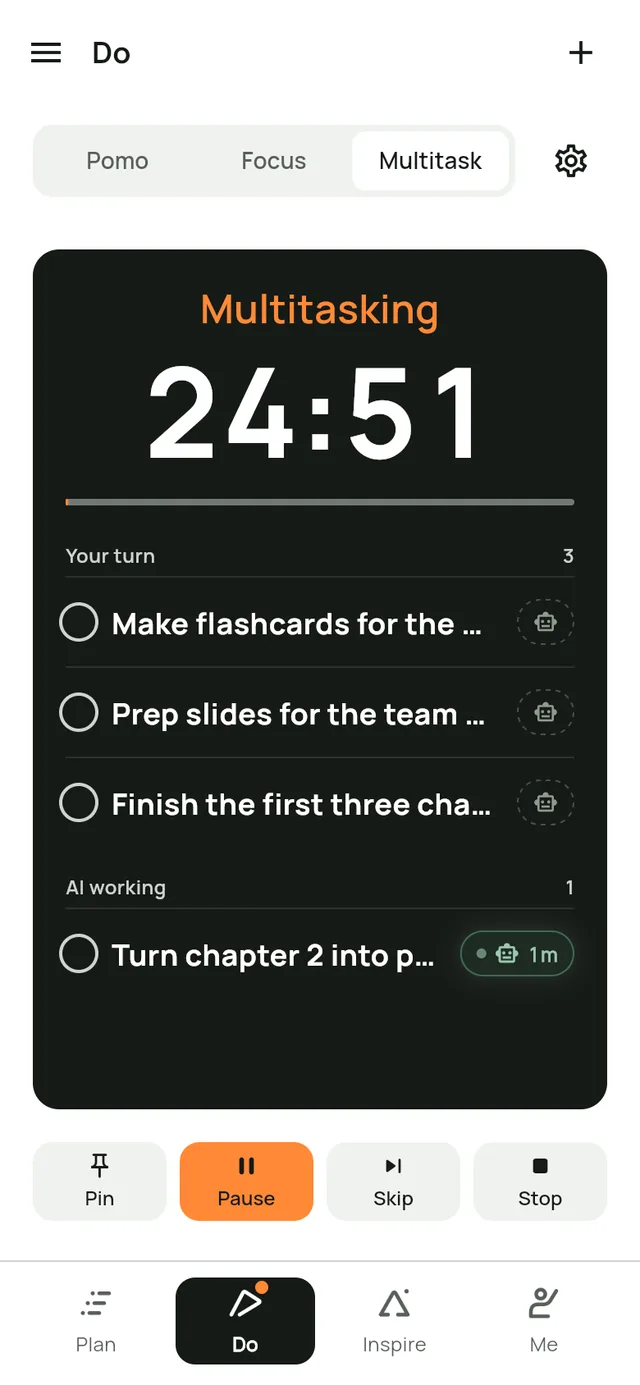
Hand a task like "Turn chapter 2 into practice questions" to your AI and mark it in Multitask. It moves to AI working while you keep going on your flashcards, and you take it back when it's ready.

  • Use whichever AI tool you like. Leapsteps keeps track of the handoff
  • Focus mode when you want one task at a time
The Do screen in Leapsteps in Multitask mode. Your turn: Make flashcards for the anatomy terms, Prep slides for the team meeting and Finish the first three chapters of the course. AI working: Turn chapter 2 into practice questions, handed over 1 minute ago.

Why steps and reasons keep you going

What goal research has found, and what Leapsteps does with it.

  • Stanford University

    Small steps beat a distant goal

    In a Stanford study, students who aimed for a small goal each session progressed faster than students given one distant goal. That's why every goal in Leapsteps gets a next step you can start this week.

    Read the study
  • University of Toronto and University of Maryland

    Goals work better with a reason and a scoreboard

    A review of 35 years of goal research found people do better when they know why a goal matters and can see their progress toward it. That's why every task can show the goal it serves, and finished steps stay in view.

    Read the review
  • McGill University

    A concrete plan helps most when the goal matters

    In a McGill study, students who planned when and where they'd act reported finishing more of their goals, especially the goals that mattered to them. That's why each task can have a due time and the goal it's for.

    Read the study

These studies test the ideas behind Leapsteps, not the app itself.

Built to keep you going for months, not days

  • See how far you've come

    Every step you finish moves to Steps achieved. Your streak and achievements show the effort in the weeks when it doesn't feel like much.

  • Keep it with you

    Plan on your phone at lunch and study on your laptop at night. Pro keeps everything in sync.

  • Make it public, if that helps

    Share a card with your goal on it, so the people around you know what you're working toward.

Questions, answered

Will Leapsteps tell me which course to take?

No. It doesn't recommend courses, schools or employers. AI drafts ideas for milestones and next steps from the goal you write, and you decide what to keep.

Can I use it to study for a certification?

Yes. Make the certification your goal, and use the steps for modules or practice exams.

I already have a plan from a course. Can I use that?

Yes. Type its milestones in yourself. AI only drafts ideas when you ask.

Does Leapsteps work offline?

Your tasks, plans and focus timer work without a connection. AI features and voice capture need one.

How much does Pro cost?

Leapsteps is free for one goal on one device. Pro starts with a 7-day free trial, and the app shows the price before you start. Cancel at least 24 hours before the trial ends and you won't be charged. Compare Free and Pro.

Your new career starts with one step this week.

Leapsteps is coming soon. Choose your device and we'll email you when it's out.

Get Leapsteps

See everything Leapsteps does

Leapsteps is coming soon

Email me when it's out on

We'll only email you when Leapsteps is out on the devices you chose. Read our Privacy Policy.